A WORKSPACE FOR ORIGINAL CONTENT

Your knowledge.
Your next video.

For founders and independent experts.

Find a useful reference. Shape a script in your voice. Edit your recording. Keep the work together, from the first idea to the final cut.

Explore the sample now. Hosted accounts are not open yet.

InspirationProjectsStudio
INSIDE GENMEDIAProjects / Script
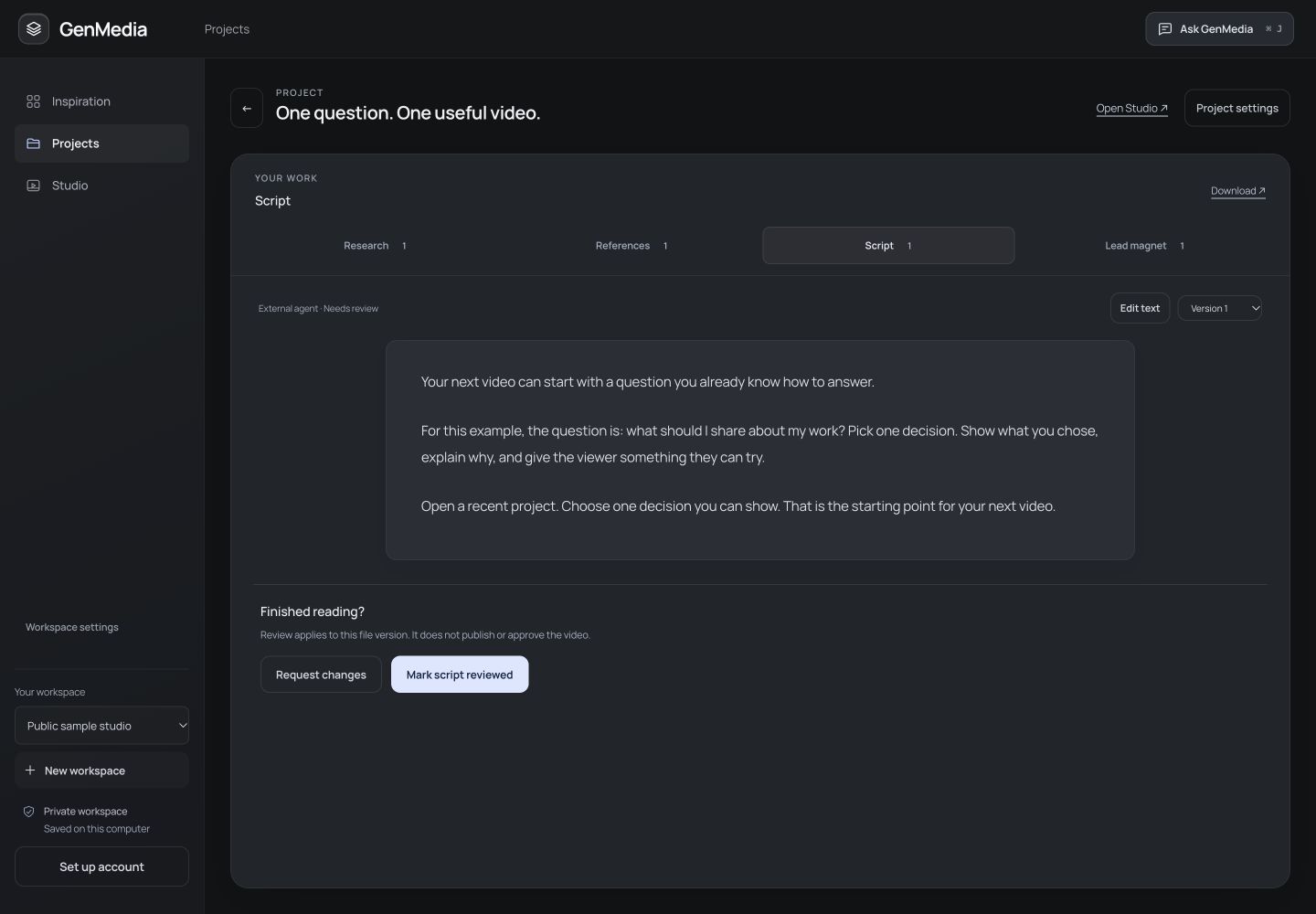
Detail of the actual GenMedia Projects canvas with its source tabs, editable sample script, saved version and review controls.
Actual app detail
Original sample writing
Full screenshot

FOLLOW THE SAME IDEA

A starting point.
Something of your own.

See where the reference ends and your contribution begins. This guided example uses actual GenMedia screens and original sample material.

01 / INSPIRATION

Find a useful idea.
Keep its source.

A reference gives you a starting point. It does not supply your experience.

THE SOURCE IDEA

Austin Kleon’s public overview of Show Your Work! encourages sharing your process and teaching what you know.

Read the author’s overview ↗

We read the overview, not the full book. The app capture uses an illustrative reference, not a collected creator post.

Current GenMedia Inspiration workspace with an original sample reference.
Actual app · illustrative referenceFull desktop view ↗

02 / PROJECTS

Your example.
Your way of saying it.

The original contribution is a practical exercise: choose one decision from a recent project and explain it.

FROM THE SAMPLE SCRIPT

“Your next video can start with a question you already know how to answer.”

Keep references, research, script versions and supporting resources with the same piece. Read and edit the writing before you record.

Read the complete script ↓
Current GenMedia Projects screen with the original sample script and review controls.
Actual app · prewritten sampleFull desktop view ↗

03 / STUDIO

Keep the lines
that matter.

Bring your recording into Studio. Edit speech sections, correct captions, save a preview and review the cut before downloading.

THIS SAMPLE’S EDIT

The project stays linked to its script. Caption choices, speech sections and saved previews live in Studio, with a deliberate review step before download.

Inspect the Studio workspace ↗

The Studio capture uses an original motion test, not filmed founder footage. Its saved preview remains unapproved.

Current native GenMedia Studio with this original sample, editable speech sections and a saved preview.
Actual app · same sample videoFull desktop view ↗

YOUR POINT OF VIEW IS THE POINT

Borrow the spark.
Bring the substance.

Useful content comes from something you can explain, demonstrate or question. Keep that contribution visible as the idea develops.

THE REFERENCE

Share the process behind your work.

THE ORIGINAL APPLICATION

Turn one decision from a recent project into a useful teaching example.

THE VIEWER’S PAYOFF

Leave with a concrete starting point for their next video.

THE COMPLETE SAMPLE SCRIPT

Something you
can actually read.

One continuous script. No missing reveal. This is original sample writing for review, not a founder or customer result.

Download script & source notes ↗
ONE QUESTION. ONE USEFUL VIDEO. ORIGINAL SAMPLE

Your next video can start with a question you already know how to answer.

For this example, the question is: what should I share about my work? Pick one decision. Show what you chose, explain why, and give the viewer something they can try.

Open a recent project. Choose one decision you can show. That is the starting point for your next video.

A question → a decision → a useful next step
How this example was made

The source idea comes from Austin Kleon’s public author overview, interpreted by GenMedia. The question, exercise, script and visuals are original illustrative material. No affiliation or endorsement is implied.

Product captures come from the current local GenMedia app in an isolated sample workspace. The sample writing was prepared for this demonstration. These screens do not show a live AI research or writing run. The motion sequence uses local synthetic narration and supplied passage timing; Studio’s maintained engine rendered its captions and saved video preview.

It demonstrates a connected sample, not measured creator results or filmed-footage quality. Hosted member accounts are not open yet.

THE NEXT STEP

Make room for
your next idea.

Request early access to GenMedia. We’ll save your interest and may contact you as access becomes available.

No payment. No account created. Invitation timing and member pricing have not been announced.

Requests are saved privately. No automatic confirmation email is sent.

BEFORE YOU GET STARTED

A few clear
answers.

What can I use today?

This website offers a guided product example and downloadable writing. GenMedia’s full workspace currently runs as a local development edition. Requesting early access does not create a hosted account.

Does GenMedia help me write and edit?

The local workspace connects references, brand context, your assistant and versioned writing. Studio edits your uploaded recordings with speech sections, captions, previews and downloads. You review writing and video separately. The public example is prewritten and does not run AI on your behalf.

Does it publish automatically?

No. You choose what to record, review and download. A generated draft or saved preview does not approve itself or publish anything.

What does it cost?

The public example and downloads are free to explore. Member pricing and invitation timing have not been announced. Connected assistant usage and local processing in the development edition have their own requirements and costs.

Can I try the writing process?

The optional browser writing exercise lets you add a decision, its reasoning and a practical takeaway. It uses a local template rather than AI and keeps your existing sample edits on this device when storage is available.